Branch profitability
Branch profitability shows what each branch earns after every cost: cost of goods, labor, its own expenses, and its share of the costs you share between branches.
Restaurant → Branch profitability. Open Branch profitability
Branch profitability is an optional module for restaurants. Turn on Branch profitability in Admin → Modules; it needs the Restaurant module. While it is off, the page explains how to enable it. Turning it off later keeps your rules, runs and closed periods.
Before you start
- Record your expenses, and classify your payables.
- Decide how shared costs are divided, and approve an allocation run for each month.
- Close the food-cost period, and finalize its prime cost.
Reading the statement
On the Actual (closed periods) basis, each column is one closed food-cost period of a branch, the same unit as prime cost.
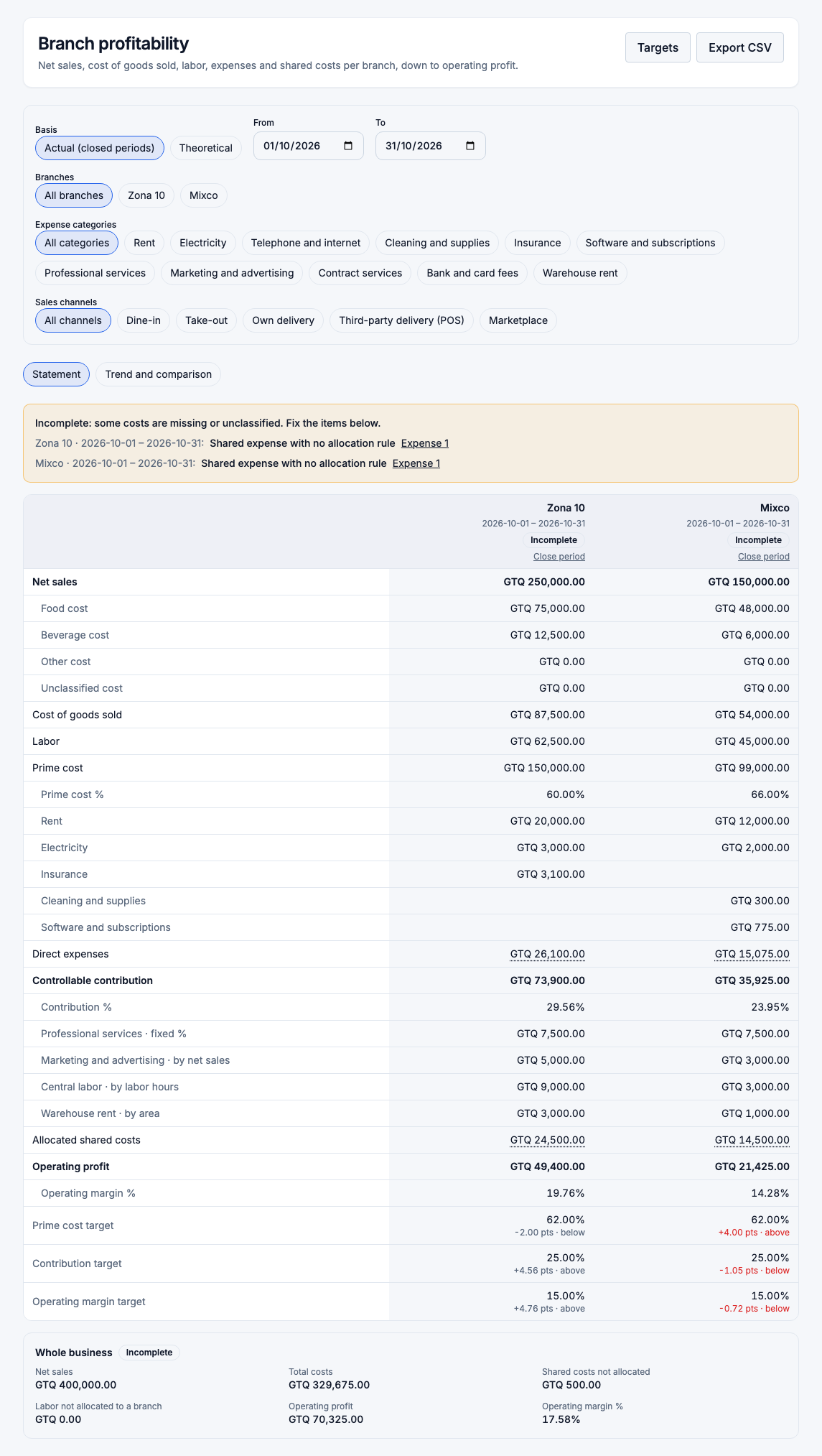
| Line | What it means |
|---|---|
| Net sales | Restaurant sales without VAT. |
| Cost of goods sold | Food, beverage, other and unclassified cost, from the food-cost period. |
| Labor | Employer labor cost of the branch. |
| Prime cost, Prime cost % | Cost of goods + labor, exactly as on the Prime cost page. |
| Direct expenses | The branch's own expenses, by category, for the days of the period. |
| Controllable contribution, Contribution % | Net sales − prime cost − direct expenses: what the branch manager controls. |
| Allocated shared costs | The branch's share of shared expenses and central labor, by category and method. |
| Operating profit, Operating margin % | Contribution − allocated shared costs, and its share of net sales. |
When the caller sees every branch, a business card adds the shared costs that were not allocated. The business's operating profit is its net sales minus every cost, and it always equals the branches' operating profit minus the costs left unallocated.
An amount FlowPOS can't know is shown as —, never as 0. A missing exchange rate on an expense is one example. Any total that depends on it is also —.
Theoretical shows weeks or months from the recipe cost of what was sold, labelled theoretical. It can't be closed. Filtering by a sales channel shows only net sales and cost of goods, because expenses and labor aren't split by channel.
Status and reasons
Each column is Final, Provisional or Incomplete, with every reason listed and linked:
| Reason | What to do |
|---|---|
| Payables not classified or without a branch | Classify them in Payables to classify. |
| Register cash expense not linked to an expense | A cash expense recorded the old way, before expenses existed. Dismiss it with a reason once you have recorded the expense. |
| Shared expense with no allocation rule | Add a rule and recompute the run. |
| Allocation driver is zero or unknown | Check sales, hours or areas for the month. |
| No allocation run for the month, or Allocation run not approved | Compute and approve the month's run. |
| Expenses changed after the allocation run | Recompute the run with a reason. |
| Recurring expense not recorded for the period | Record it, or Dismiss the warning with a reason. |
| Recurring expense still a draft | Approve or void the draft. |
| Exchange rate missing for a foreign-currency expense | Add the rate on the expense. |
| Prime cost not finalized | Finalize prime cost for the period. |
Prime cost's own reasons (open payroll run, unapproved attendance…) are listed too.
A category that had an expense in each of the branch's last three periods but has none in this one is flagged as Recurring expense not recorded.
Targets
Targets (on the Prime cost page) now also take Operating margin % and Controllable contribution %, per business with branch overrides. For these two, higher is better.
Trend, comparison and drill-down
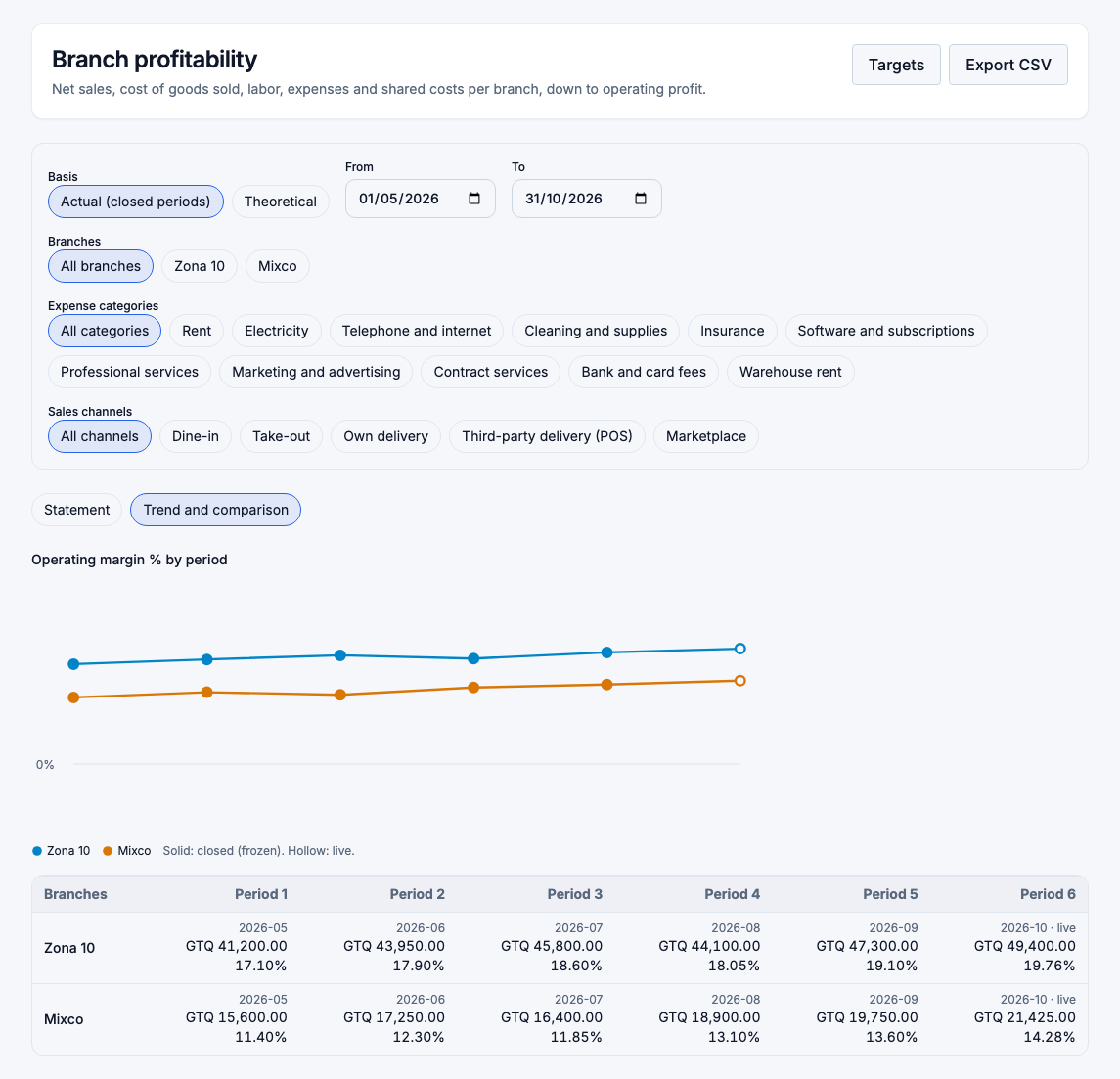
- Trend and comparison shows operating margin % over the last six periods of each branch, side by side. A closed period's point is solid and a live one hollow. When branches' periods cover different dates, the comparison says so.
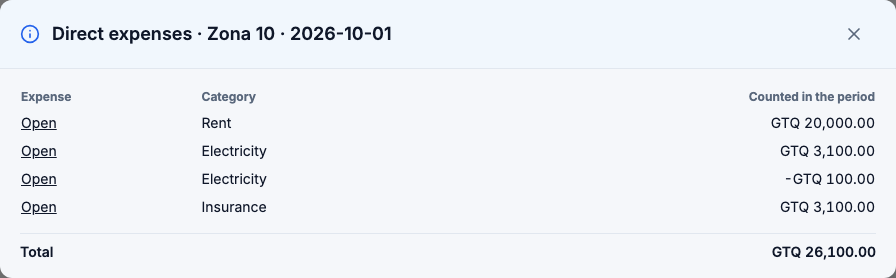
- Click Direct expenses to see each expense with the amount counted in the period, or Allocated shared costs to see each share with its rule, method and driver values. Each list adds up to the figure.
- Export CSV downloads the report as you see it. Each export is recorded in the activity log.
Close a period
When a column is Final and its prime cost is finalized, choose Close period. If something blocks it, the dialog lists what to resolve first.
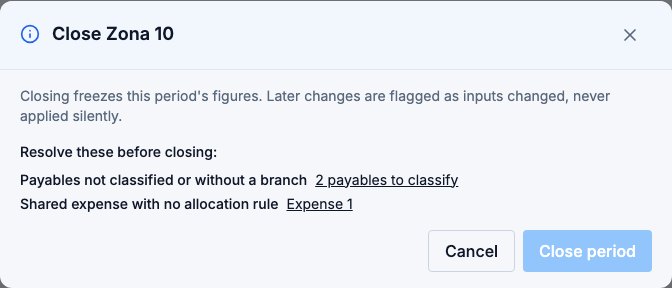
Closing freezes the period's figures. If an input changes later (a late expense, a reclassified payable, a recomputed run, a new target, prime cost reopened), the figures don't move. The column says Frozen figures and which inputs changed.
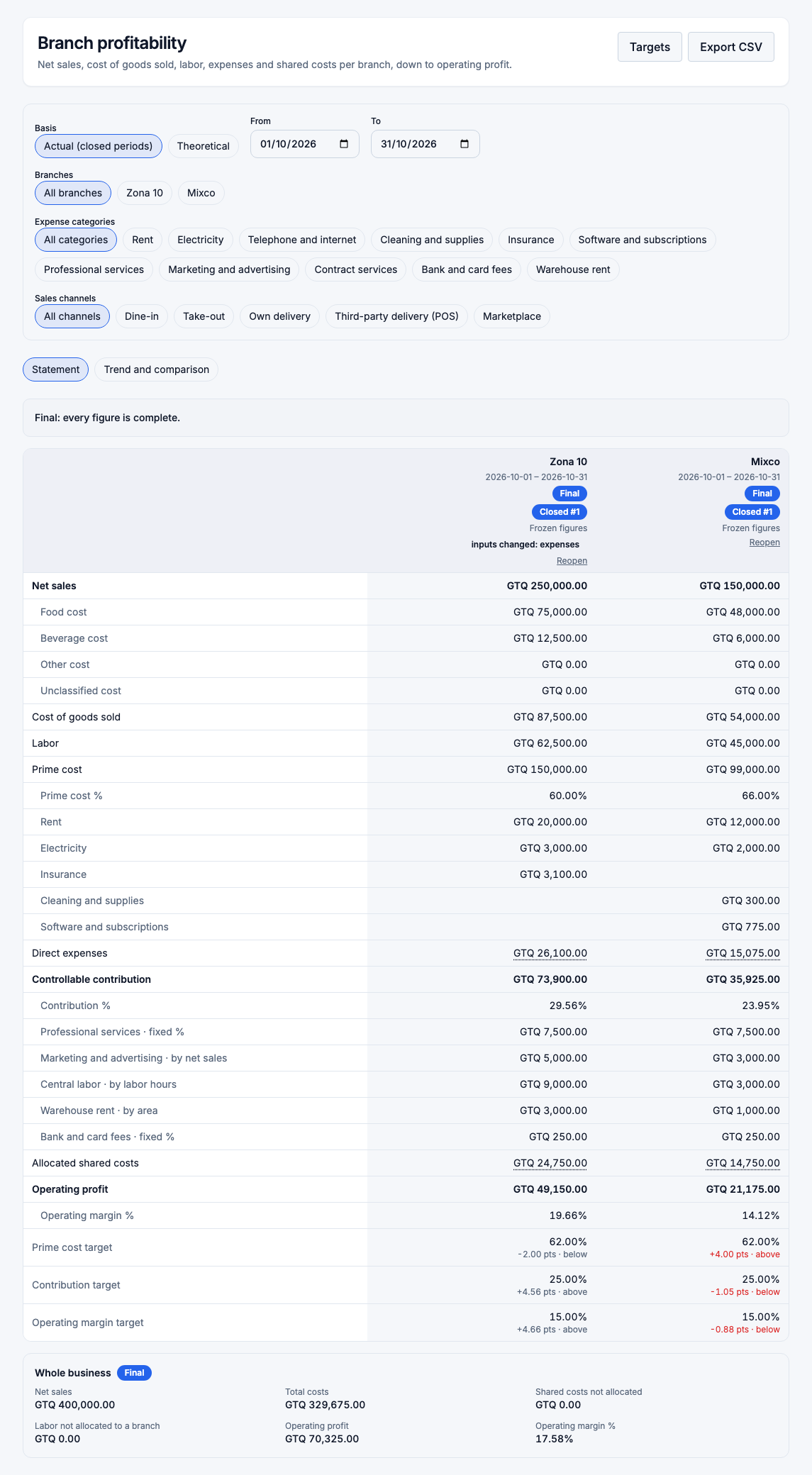
To take a change into account, Reopen the period with a reason, then close it again. Every closed version is kept.
Who sees what
- Owners, administrators and finance managers see every branch and the business card.
- Store managers see their own branches only, with no business card and no other branch's figures.
- Without payroll access, a branch whose labor line has fewer than 3 people hides labor, prime cost, contribution and operating profit. The same applies to central labor from fewer than 3 people: that share, the allocated total, operating profit and margin are hidden. Target status stays visible.