Sauces, doughs and other prepared items
Many dishes use something your kitchen prepares in batches — a house sauce, a dough, a stock. In FlowPOS, that prepared item is a product of type component, and it can have its own recipe.
Set one up
- Create the prepared item as a product of type component, stocked in the unit you make it in (for example litres for a sauce).
- In Restaurant → Recipes, choose New recipe, search for the prepared item and choose Create recipe.
- Set the Yield to the batch size — for example 2 L — and add its ingredients.
- Publish… it.
Example: a house sauce made from 2 kg of tomato at Q 50.00/kg costs Q 100.00 per batch of 2 L, which is Q 50.00 per litre.
Use it in a dish
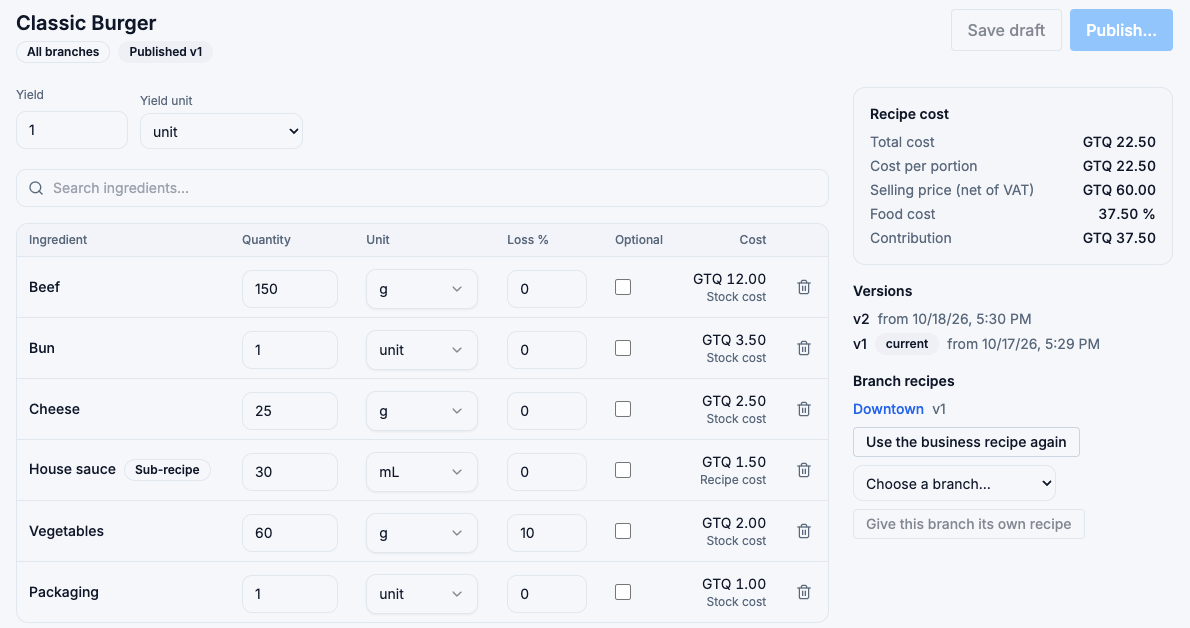
Add the prepared item to a dish like any other ingredient, in the unit you measure it in. The line shows a Sub-recipe badge, and its cost says Recipe cost. Choose the badge to open the prepared item's recipe.
With the sauce above, 30 mL in a burger costs Q 1.50.
What happens when the dish is sold
The prepared item is taken out of stock as itself — 30 mL of sauce — not as the tomatoes it was made from. Those were used when the batch was made.
Where the cost comes from
- If the prepared item has a cost of its own (for example because you produce it with a production run that records its cost), that cost is used — the line says Stock cost.
- If it has no cost of its own, the cost comes from its published recipe — the line says Recipe cost.
When an ingredient of the sauce gets more expensive, every dish that uses the sauce is recalculated as well.
Production formula warning
If the prepared item also has a production formula (used for production runs), the recipe editor warns you when the two don't agree: a different yield, different ingredients, or a formula unit that can't be converted. Update one of them so your production and your recipe describe the same batch.