Labor cost
The labor report shows what your staff cost you as an employer, per branch: wages, overtime, employer contributions and provisions. It also shows the hours worked, labor as a share of net sales, and sales per labor hour.
Restaurant → Labor cost. Open Labor cost
Where the figures come from
- FlowPOS payroll gives the cost of each payslip.
- Approved attendance says where and when each person worked. Payroll has no branch, so each payslip is spread over the branches in proportion to the minutes worked there.
- Staff who don't clock in, such as a general manager or a chef who covers two branches, are placed by a labor allocation rule: split between branches, kept at their home branch, or counted as Central.
- If you don't run payroll in FlowPOS, you enter manual labor instead.
Only what the employer pays counts. Tips are not labor cost, and neither are deductions (they are the employee's money). See What counts as labor below.
Reading the report
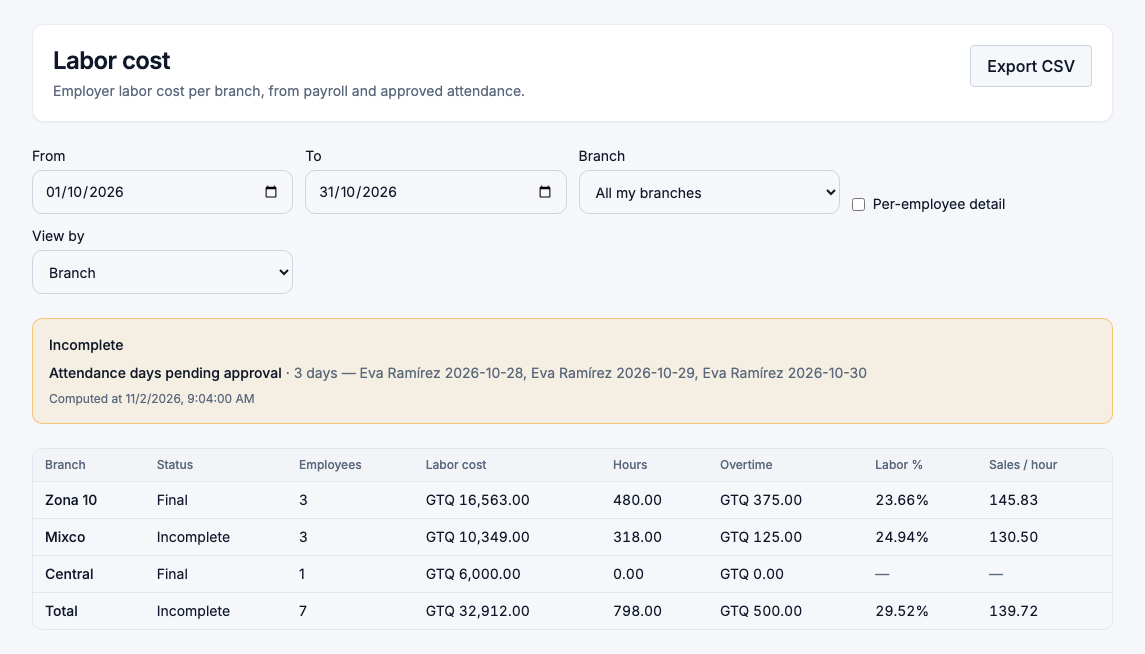
Choose the dates, a branch or All my branches, and how to View by:
| Column | What it means |
|---|---|
| Status | Final, Provisional or Incomplete. See below. |
| Employees | People with cost on this line. |
| Labor cost | Employer cost: wages, overtime, contributions and provisions. |
| Hours | Hours worked, from approved attendance (or your manual entries). |
| Overtime | The overtime part of the labor cost. |
| Labor % | Labor cost ÷ net sales of the branch for the same dates. |
| Sales / hour | Net sales ÷ hours worked. |
A line called Central holds the cost of people who don't belong to any branch. It is part of the total, but no branch carries it.
Use Export CSV to download exactly what you see.
When is a figure final?
Labor is Final only when the payroll run for those dates is closed and all the attendance in it is approved. Until then, the report says:
- Provisional when the only thing missing is that a calculated payroll run is not closed yet.
- Incomplete when anything else is missing.
The yellow box lists exactly what is missing: a run still in review, attendance days pending approval (with the person and the dates), someone who worked but was not in payroll, cost that no rule places on a branch. Fix those and the report turns final on its own.
When an amount can't be known, it shows as —, never as 0. A lower number that leaves someone out would look right and be wrong.
By department or daypart
View by → Department groups the cost by the department each person belonged to on each day, so someone promoted mid-month is split between their old and new departments.
View by → Daypart groups it by the bands you set in Labor settings, such as Breakfast, Lunch and Dinner. Only clocked time has a daypart: salaried, shared and manual labor shows under No daypart.
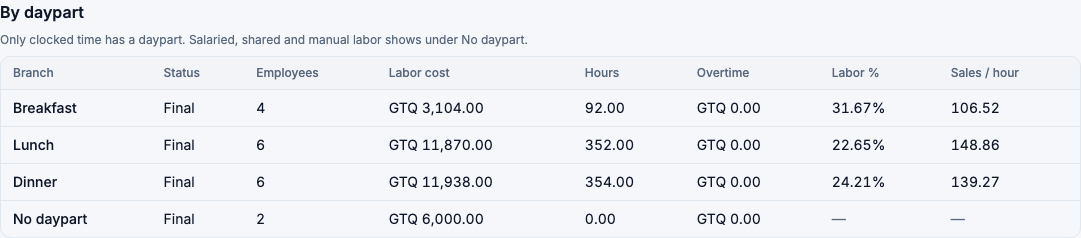
The groups always add up to the branch totals exactly.
Who sees what
The report is available to owners, administrators, store managers and finance managers, for the branches they are assigned to.
People with payroll access (owners and payroll administrators) see every amount, and can tick Per-employee detail.
People without payroll access see hours and ratios, but not the amounts of any line with fewer than 3 people, so nobody can work out a colleague's pay. Departments and dayparts that small are grouped as Other, and a total that would reveal a hidden line by subtraction is hidden too.

Someone without payroll access who compares two periods whose staff differs by exactly one person may still be able to estimate that person's pay. This is a known limit.
What counts as labor
- Counted: wages, overtime, employer contributions (such as IGSS), and the monthly provisions for aguinaldo, Bono 14, vacation and severance.
- Not counted again when paid: aguinaldo, Bono 14 and severance payouts. They were already counted month by month as provisions.
- Vacation is counted when it is paid, not as it accrues.
- Not counted: tips, deductions, and any pay item you exclude in Labor settings.
Labor cost is a management figure for running the restaurant. It is not your accounting payroll expense.