Payables to classify
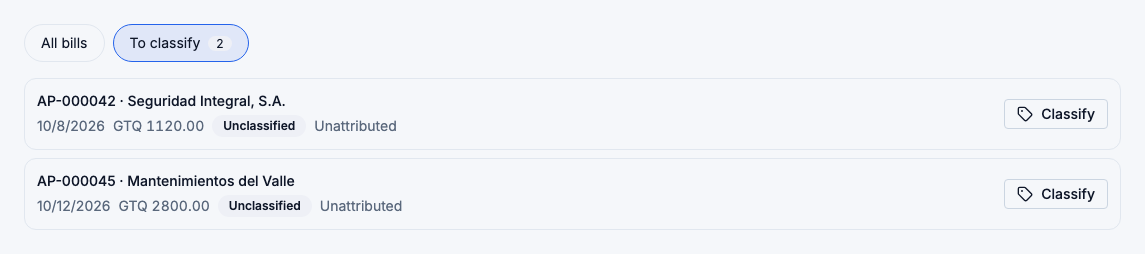
Every bill in Accounts Payable now shows two things:
- Classification: Inventory purchase, Operating expense, Not an operating cost or Unclassified.
- Belongs to: a branch, Shared, or nothing yet.
Accounts Payable → Bills → To classify. Open the bills to classify
What is classified for you
- Bills from purchases are inventory purchases at the purchase's branch. If the purchase moves to another branch, the bill follows it, unless you have changed it yourself. A purchase bill can't become an operating expense: inventory reaches your costs as cost of goods sold, when it is used.
- Bills created by an expense take the expense's category and branch. Change them through the expense, not the bill.
- Manual bills and contractor bills start Unclassified, including the ones you had before this change. FlowPOS doesn't guess.
Classify a bill
Choose Classify on the bill:
- Pick the Classification.
- Choose Belongs to: a branch, or shared.
- For an Operating expense, also choose the Expense category and the Service from / to dates, and enter the VAT included in the total, saying whether it is recoverable. Contractor bills are prefilled with Contract services and the assignment's branch.
- Save classification.
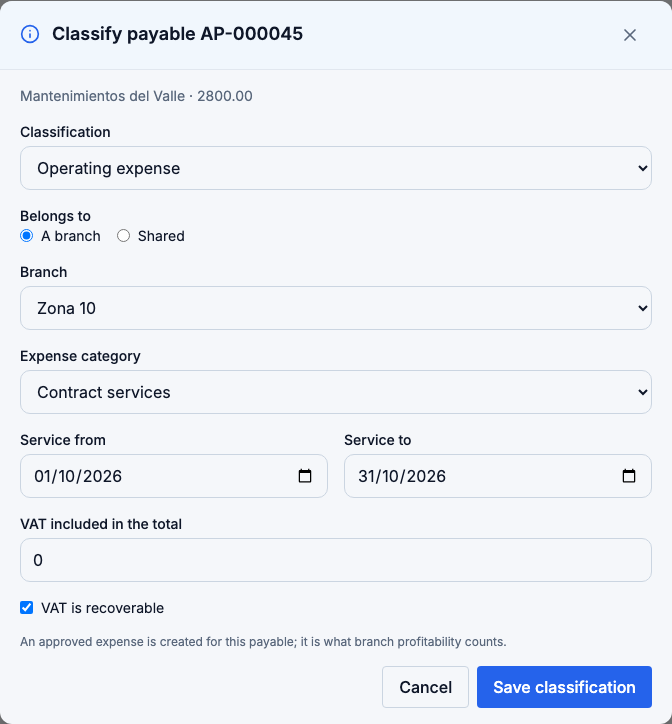
Classifying a bill as an operating expense creates an approved expense linked to it. That expense is what branch profitability counts, once. No second payable is created. If you later void that expense, the bill goes back to Unclassified; the bill itself is not voided.
Every change is recorded in the activity log with its before and after values.
Why it matters
Branch profitability marks a period Incomplete while any bill dated in it is unclassified, or is an operating expense with no branch, and it lists those bills. Classifying them is usually the first step to a final period.
Re-entering a voided invoice
A voided bill no longer holds its supplier invoice number. If you void an expense and record it again with the same invoice, FlowPOS accepts it. Two live bills still can't share one invoice number.