Menu engineering
Menu engineering compares the dishes in a category on two things:
- Popularity: how many of the category's dishes sold were this one (its menu mix).
- Contribution: what each dish earns per unit after its food cost: net selling price minus what its ingredients cost.
Each dish lands in one of four groups:
| Earns a lot per unit | Earns little per unit | |
|---|---|---|
| Sells a lot | Star: keep it as it is and protect its place on the menu. | Plowhorse: popular but thin; review the portion, the recipe cost or the price. |
| Sells little | Puzzle: profitable but overlooked; give it a better spot, a better description, or ask staff to suggest it. | Dog: rework it, reprice it, or consider taking it off. |
The report only reads your sales and costs. It never changes a price or a menu.
Restaurant → Menu engineering. Open Menu engineering
Menu engineering shows costs and margins, so it is available to owners, administrators, store managers and accountants. Cashiers and sales associates don't see it.
Choose what to analyse
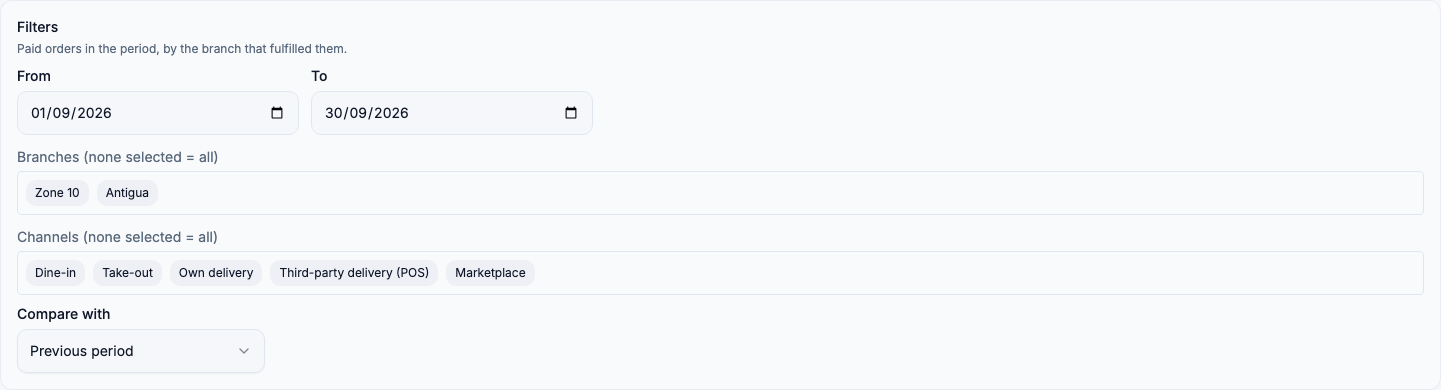
- From / To: the period. It opens on last month. An order counts on the day it was paid, in the branch's own time zone.
- Branches: leave none selected to include every branch you are assigned to, or pick some. An order counts at the branch that prepared it, even if another branch took it.
- Channels: dine-in, take-out, your own delivery, third-party delivery taken at the POS, and marketplace orders. Leave none selected to include all of them. Thresholds are recalculated for the channels you pick.
- Compare with: the previous period (by default), another period you choose (for example the same month last year), or no comparison.
Then choose a Category. Dishes are only ever compared with others in the same category, because a dessert shouldn't compete with a main course.
Read the matrix
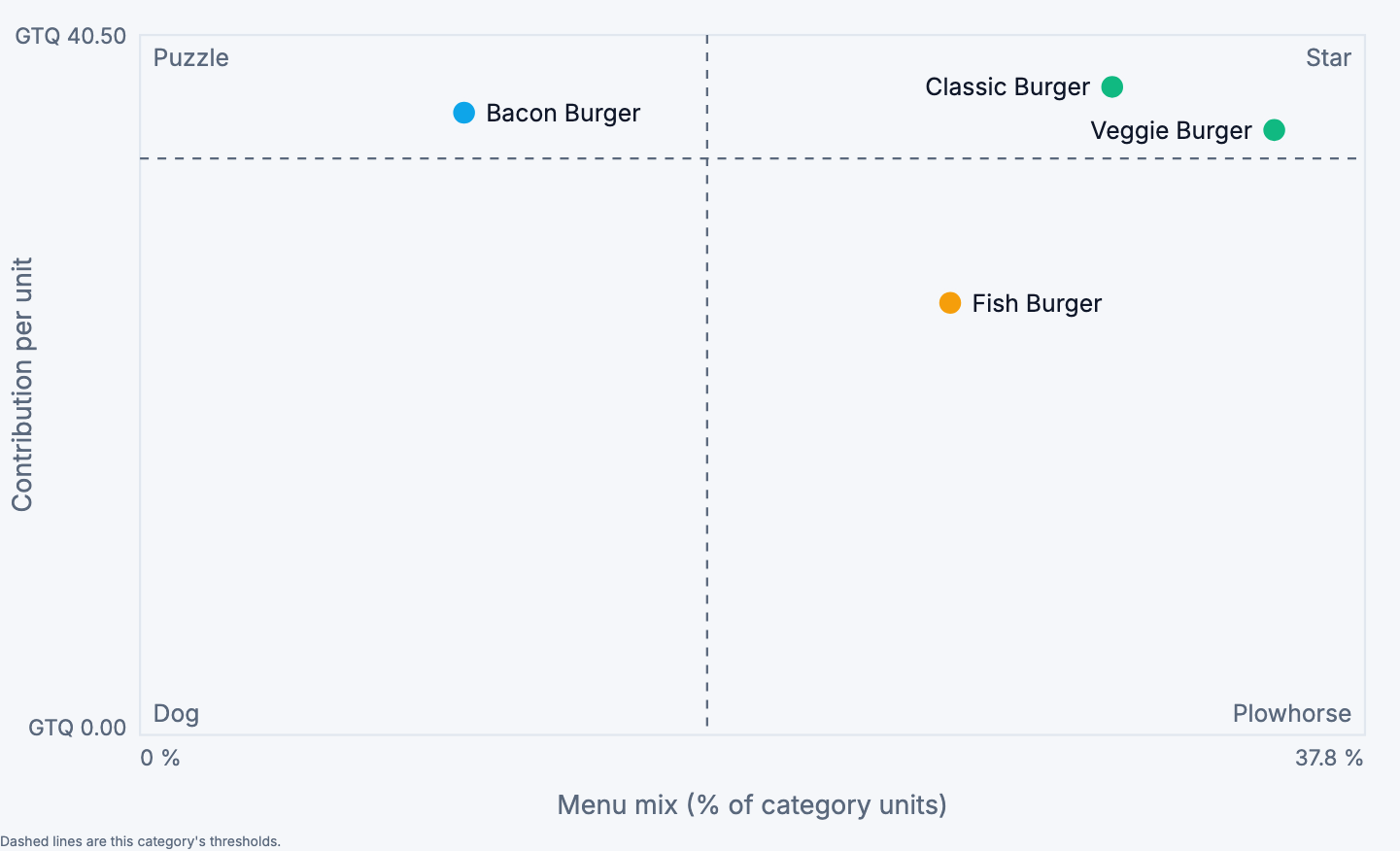
Each point is a dish:
- Left to right is its menu mix: its share of the category's units.
- Bottom to top is what it earns per unit.
The dashed lines are the category's thresholds. Above the horizontal line, a dish earns at least as much as the category's average dish. Right of the vertical line, it sells at least 70 % of an equal share. With four burgers, an equal share is 25 %, so the line sits at 17.5 %.
Above, the Fish Burger sells well but earns little per unit: a Plowhorse. The Bacon Burger earns well but sells little: a Puzzle.
The table
| Column | What it shows |
|---|---|
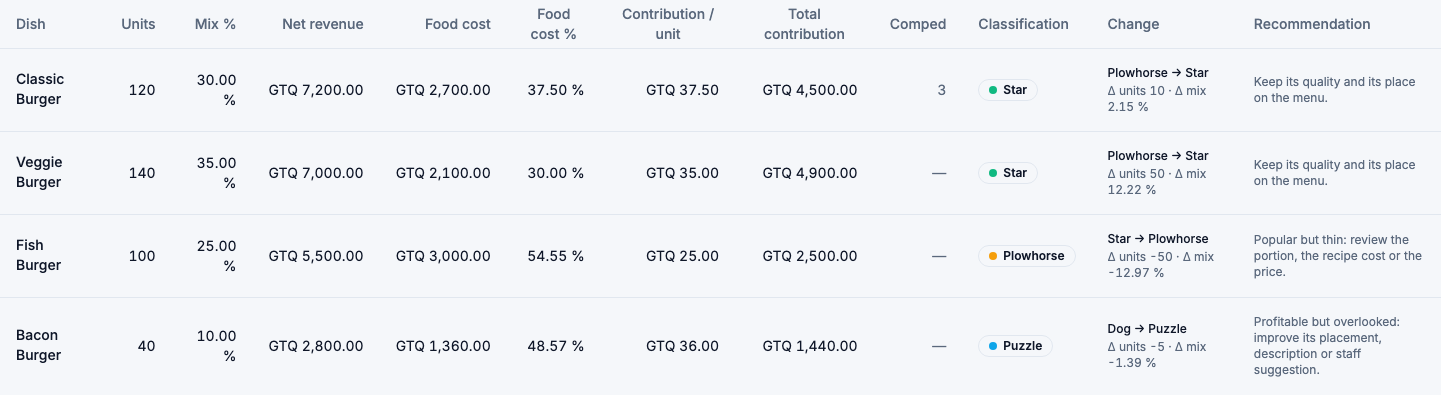
| Units | Dishes sold and paid in the period. Voided and cancelled items are left out. |
| Mix % | This dish's share of the category's units. |
| Net revenue | What customers actually paid for it, without VAT and after discounts. |
| Food cost / Food cost % | What its ingredients cost when it was sold, and that cost as a share of its net revenue. |
| Contribution / unit | Net revenue minus food cost, per unit sold. |
| Total contribution | Contribution / unit × units. |
| Comped | Units given away. They count neither as sales nor as revenue, so they are shown apart. |
| Classification | Star, Plowhorse, Puzzle or Dog. |
| Change | With a comparison: its classification then and now, and how its units and mix changed. New means it didn't sell in the comparison period. |
| Recommendation | What the classification suggests doing. |
Choose a column heading (Units, Food cost %, Contribution / unit, Total contribution) to sort by it.
Active dishes on a branch's menu that didn't sell in the period are listed under the table as No sales in period. They don't lower the other dishes' thresholds.
When a dish shows "Not classified"
A dish can only be classified if FlowPOS knows what it cost. If a dish has no recipe, or an ingredient has no cost, its cost is unknown, not zero. A zero cost would make it look like a Star.

Above every matrix, FlowPOS tells you how much of the category's revenue has a known cost, and why the rest doesn't:
- Missing recipe: a dish that should have a recipe has none.
- Uncosted ingredient: its recipe uses an ingredient with no cost.
- Sold before costing began: orders from before recipe costing was turned on.
- No cost recorded: orders with no cost on record.
When less than 80 % of a category's revenue is costed, the category is marked Incomplete. Use the links to go straight to the dishes to fix in the recipe list.

A dish with no known cost still shows its units and revenue. Its cost columns show —, it is Not classified, and it isn't plotted on the matrix. A dish with only some of its sales costed is classified on those sales and tagged Partially costed.
Combos
A combo is judged as a dish of its own:
- Bundles (a meal of a burger, fries and a drink) appear under Combos.
- Combo products with choices appear in their own category.
The burger inside a meal doesn't count as a burger sale, so the Classic Burger is judged on the burgers sold on their own.
To see what your dishes sell inside combos, open Dishes inside combos below the table:
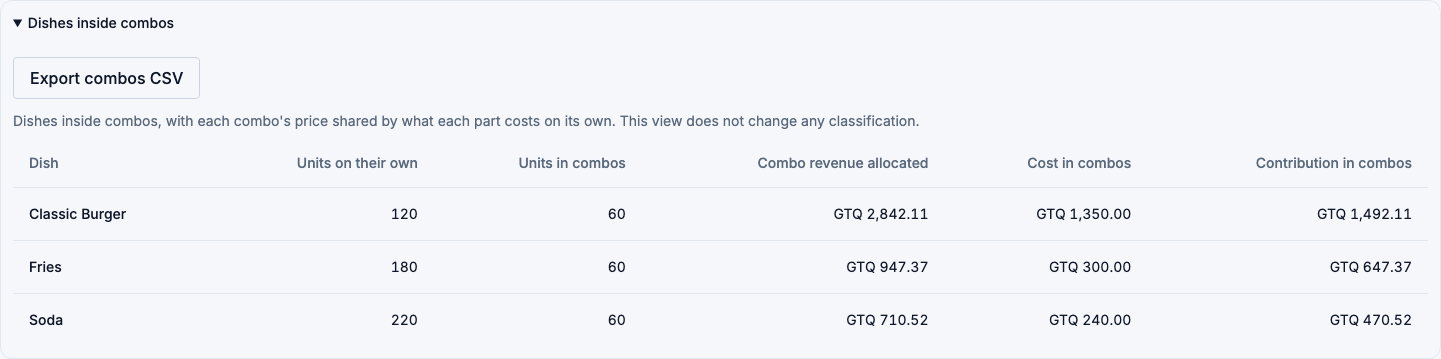
Each combo's price is shared among its parts by what each part costs when sold on its own. A Q 75 meal of a Q 60 burger, Q 20 fries and a Q 15 drink gives the burger Q 47.37, the fries Q 15.79 and the drink Q 11.84. A part that costs extra (for example large fries) keeps its extra charge. This view is for information; it never changes a classification.
Allocation estimated means the combo was sold before FlowPOS started recording its parts' prices, so today's prices were used.
Thresholds
To change how popular and how profitable a dish must be to count as high, choose Thresholds:
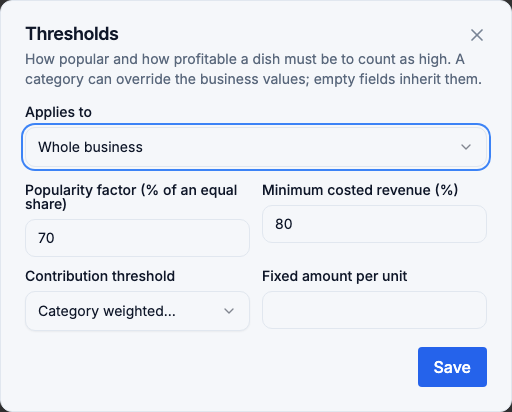
- Applies to: the whole business, or one category. A category's empty fields inherit the business values. Reset to inherit clears a category's own values.
- Popularity factor: how much of an equal share a dish must sell to count as popular (70 % by default).
- Minimum costed revenue: below this share of known costs, a category is marked incomplete (80 % by default).
- Contribution threshold: the category's weighted average (by default), or a fixed amount per unit that you set.
Only administrators can save thresholds. Everyone who can open the report sees the thresholds in use. If someone else saved while you were editing, you are asked to reload.
Export
Choose Export CSV to download the table. Export combos CSV, inside Dishes inside combos, downloads that view. Each file includes the period, the thresholds and coverage, and the comparison when there is one. Unknown costs are left empty, never written as 0.
Good to know
- Discounts: a dish's revenue is what was actually charged. A bundle discount recorded on one item is shared among the items it covered.
- Order-level discounts: these are currently shown on the order but not taken off the bill. They don't reduce revenue here, and their total appears under the report as order discounts recorded but not charged.
- Marketplace orders: their contribution is before the platform's commission.
- Costs come from the moment of sale: changing a recipe or an ingredient's cost doesn't change the cost of dishes already sold.